
Snap, Done, Drink: How We Just Saved You 10 Minutes of Scorecard Entry

You just finished 18 holes in 95-degree heat. Your swing felt great on the back nine, you made a ridiculous birdie putt on 16, and you're ready for a cold beverage.
There's just one problem: you still need to type 18 hole scores into your phone so you can track your round.
Not anymore.
The Problem: Post-Round Data Entry Sucks
Let's be honest—manually entering scores hole-by-hole is the worst part of using any golf app. After 4+ hours on the course, the last thing you want to do is squint at your smudged scorecard and tap numbers into tiny boxes.
So what do most golfers do? They procrastinate. They stick the scorecard in their glove compartment, promising themselves they'll "do it later." Three weeks go by, and the scorecard is illegible. The round never gets logged. Your handicap stays inaccurate.
The Solution: AI-Powered Scorecard Scanning
Starting today, Premium users can skip the data entry entirely. Here's how it works:
- Take a photo of your scorecard (even if it's wrinkled, coffee-stained, or written in questionable handwriting)
- Wait a few seconds while our AI reads every hole
- Verify the scores (AI highlights any uncertain digits in yellow)
- Done. Your round is saved with full stats, photos attached.
That's it. No typing. No transcription. No waiting.
Real-World Use Cases
"The Traditionalist"
Some golfers prefer paper scorecards during play (no phone distractions, no battery anxiety). Now they can have the best of both worlds—play with paper, digitize with AI.
"The Forgetful Friend"
Your buddy insists he shot 83, but you remember it being closer to 91. Pull up the scorecard photo. Case closed.
What's Next: Phase 2 (Multi-Player Extraction)
Right now, the AI extracts all players on a scorecard but asks you to pick which scores are yours. Phase 2 (coming Q1 2026) will let you:
- Upload one scorecard with 4 players
- Match names to your Buddies list
- Create rounds for your entire group with one photo
Imagine: post-round, the organizer snaps one photo, and everyone's round is logged automatically. That's the goal.
Try It Today
The Scorecard Photo Upload feature is live now for Premium subscribers. To try it:
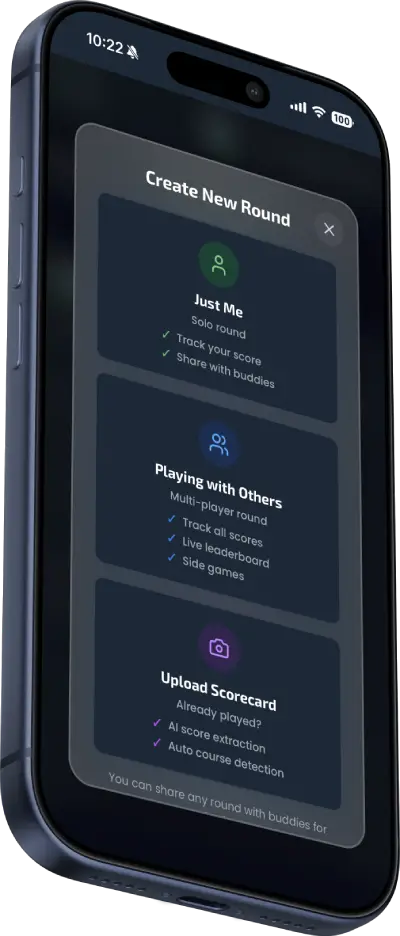
- Tap "New Round" → "Upload Scorecard Photo"
- Take a photo or upload from your device
- Let AI do its thing
- Verify, save, done.
Next time you finish a round and someone asks, "Did you log your scores yet?"—you can say:
"Already done. I just took a picture."
Try Scorecard Upload
Upgrade to Premium to unlock AI scorecard scanning, unlimited guest players, and advanced tournament features.
Recommended Products

Titleist Pro V1x Left Dash Golf Balls
Titleist® Pro V1x® Left Dash golf balls are designed for players seeking a high flight similar to Pro V1x® with dramatically lower full swing spin and firmer feel.

Par Three Golf Putting Green (3' x 9')
Hone your putting skills with this fun 3-by-9-foot putting green. The kidney-shaped green's three cups give you plenty of practice targets, while the built-in sand traps are designed to catch missed shots. The green also offers a high-quality putting surface designed to stay smooth over time.