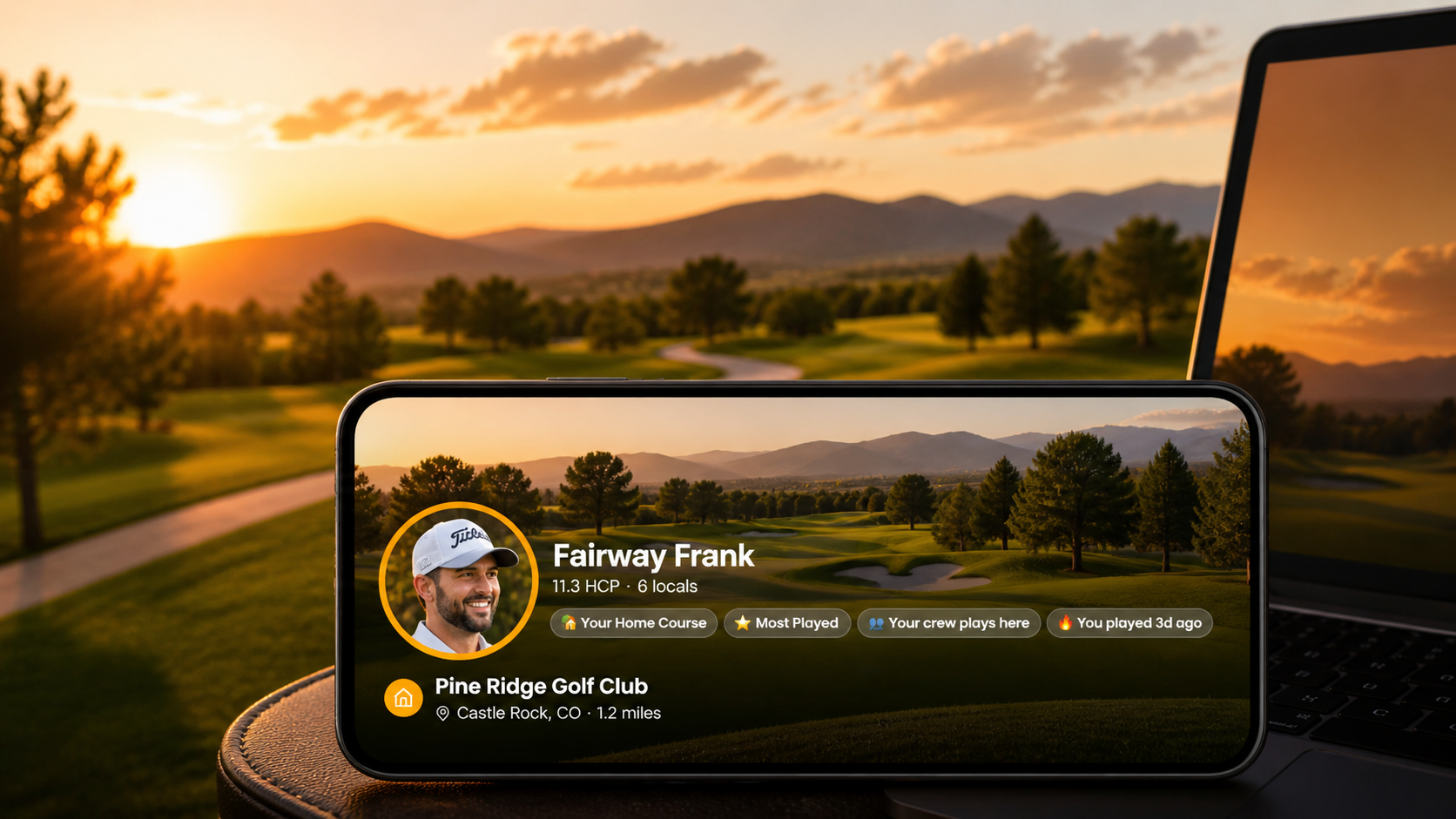
Your Home Course Just Got a Lot More Social

Every golfer has a home base. The course you know hole-by-hole, where the starter knows your name, where you've shot your best round and your worst. Today, that course finally gets the attention it deserves on Buddies on the Green.
We're rolling out the Home Course Community page — a personalized hub at /home-course that surfaces who plays your course, what they're shooting, and how to get a round together fast.
Set your home course in 30 seconds
Head to your Profile → Edit → Home Course and search for the course you play most often. We use Google to find it (so the name reads like the marquee out front), then quietly attach official scorecard data so you can play rounds with full stats.
Got a course with multiple 9-hole combinations like Fox Hollow's Links / Canyon / Meadow? We'll ask you which combination you usually play — no more guessing which "course" the scoring system means.
Your home base, visualized
Once it's set, your home course shows up everywhere it should:
- One-tap round setup on the round creation screen with a featured Home Course card pinned at the top
- Pinned with a 🏡 Home badge on your saved courses list, so you spot it instantly
- Performance summary on your dashboard: rounds played, avg score, best score — at this course only
- A new community page at /home-course dedicated to who else calls it home
The community page is where it gets interesting
The hero shows the course photo with your avatar overlaid — this is your home base, made personal. Below your name, a row of contextual badges adapts to your activity:
- 🏡 Your Home Course — always shown when you're on your own course
- ⭐ Most Played — when this is the course you've played more than any other
- 👥 Your crew plays here — when 2+ of your buddies share the same home course
- 🟢 2 buddies played today / 🔥 5 buddies here this week — live activity from rounds your buddies have shared
Static labels are fine. Live signals are better. We wanted this page to feel less like a profile and more like a place where things are happening.
Meet your locals
Below the hero, the Locals tab lists every Buddies on the Green player who calls this course home — split into Your Buddies and Other Locals so you can spot connections fast.
Buddy rows are smarter than a name and a handicap. Each one carries a behavior signal pulled from rounds your buddy has shared with you:
- "Played 2d ago"
- "3 rounds this month"
- "Avg 84 here"
You can scroll the list and feel the rhythm of your home course — who's been on it, who's playing well, who you should call about Saturday.
From "interested" to "tee time" in two taps
The biggest shift: tap any buddy row and a quick actions sheet slides up with three shortcuts:
- 🏌 Invite to round — kicks off a multi-player round at this course with the buddy already added. You skip course selection entirely and land on tee selection. Two taps from "I should call Dave" to "Dave's invited and we're picking tees."
- 💬 Message — opens a direct conversation with that buddy
- 👤 View profile — see their full handicap and recent rounds, with a smart back button that returns you to the community page when you're done
For locals you don't know yet, an Add button on the row sends a buddy request directly. They show up under "Your Buddies" the moment they accept.
Privacy is a setting, not a guess
Players whose profiles are set to private don't appear in the locals list. Period. If you want to play this course without being listed publicly, set your profile visibility to private in your settings — your home course still counts toward the global tally but you stay off the page.
What's next
This is launch one of three. Two more tabs — Leaderboard and Activity — are scaffolded with "Soon" badges. Coming soon:
- Leaderboard: best score, most rounds, lowest avg among locals at your course
- Activity: a feed of recent rounds, photos, and conditions reports tied to the course itself
The home course is more than a setting — it's the anchor we'll keep building on.
Get started
- Open Buddies on the Green and tap Profile
- Tap Edit Profile, then Select Home Course
- Search for your course and pick it
- Tap Save Changes
- Visit /home-course to see your community, select the Home Course on the Dashboard menu, or the mobile menu under Courses.
That's it. Welcome home.
Set your home course today
Two minutes to set up. A community waiting on the other side.